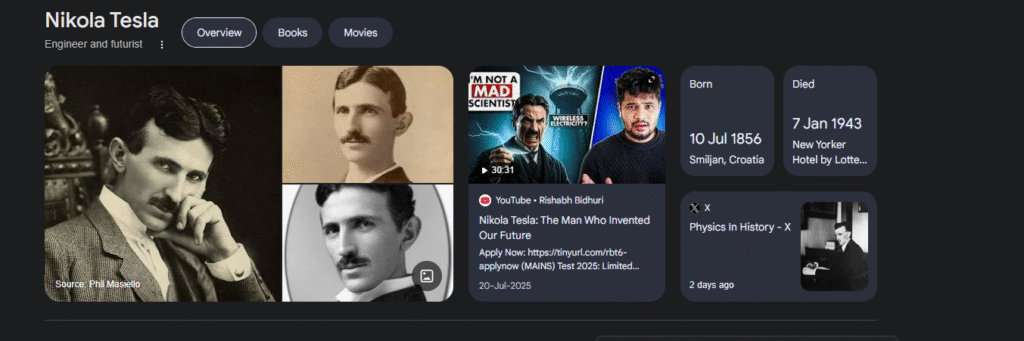
A Google Knowledge Panel is the information box that appears on the right side of Google’s search results when you look up a well-known person, brand, or organization. It shows verified facts such as a short description, social profiles, images, and links to related resources.
This panel is powered by the Google Knowledge Graph, a vast database that stores billions of relationships between entities on the web. The Knowledge Graph helps Google understand how people, companies, and topics connect. When Google trusts the data about an entity, it creates a visual summary called the Knowledge Panel.
For example, when you search for “Nikola Tesla,” you will see an information box that lists its founder, headquarters, website, and stock symbol. That is the Knowledge Panel at work.
Why Are Google Knowledge Panels Important?
Knowledge Panels increase visibility and strengthen brand authority. They make your business or personal profile appear credible and trustworthy. When users see a panel, they instantly recognize that the information comes from verified sources rather than random listings.
For professionals and companies, this presence can:
- Improve brand trust and reputation.
- Increase click-through rates from search results.
- Help customers find official information quickly.
- Support your broader SEO and entity-building strategy.
A Knowledge Panel acts as Google’s public confirmation that your brand exists and is notable enough to be recognized as an entity.
How Does Google Generate Knowledge Panels?
Google collects data from multiple trusted databases and combines it into one unified profile. The main sources include:
- Wikipedia and Wikidata for verified factual data.
- Official websites that act as the entity’s home.
- Structured data such as Organization or Person schema.
- Social media profiles and reputable directories like Crunchbase or LinkedIn.
- Google Business Profile information for local entities.
Once the data is corroborated and matches across several platforms, Google’s systems display a Knowledge Panel automatically.
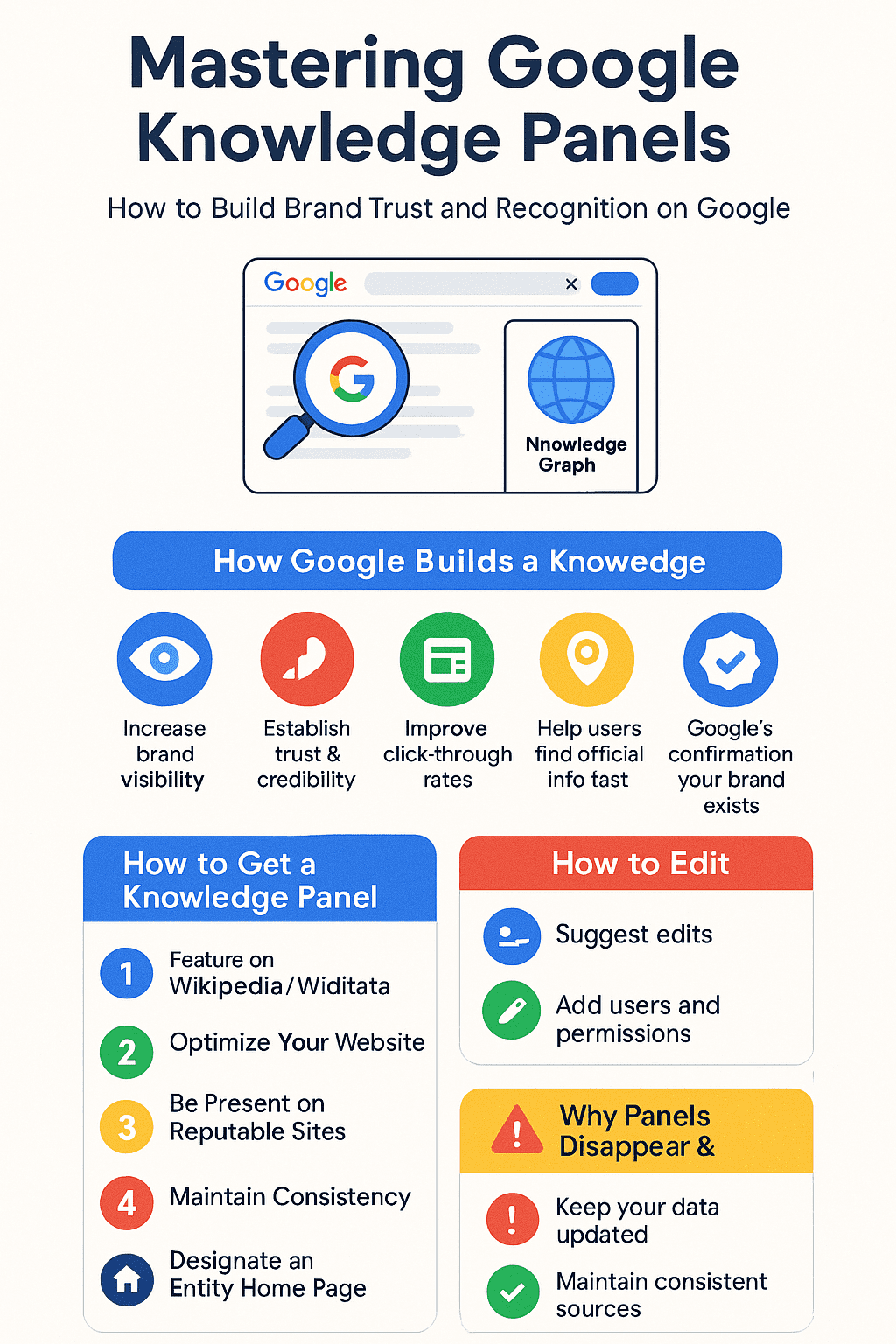
How to Get a Google Knowledge Panel
There is no direct form to request a panel, but several actions can increase the likelihood of earning one.
Feature on a Wikipedia page
Mentions or citations in Wikipedia or Wikidata make it easier for Google to verify facts. Avoid creating a self-promotional page; instead, contribute factual, referenced information that meets editorial standards.
Use your website as a tool
Your official website should serve as your Entity Home. Include accurate details about your company, founder, services, and contact information. Use structured data markup to help Google interpret this information correctly.
Feature on reputable third-party websites
Appear on credible media outlets and directories that Google already trusts. Consistent mentions on sites like Crunchbase, Search Engine Journal, or Business Insider strengthen your brand’s legitimacy.
Boost your online presence on social media
Maintain active, verified social media accounts. Google cross-checks details from these platforms to confirm authenticity. Ensure that your profile descriptions match the information on your website.
Pick a Primary Entity Home Page
Designate a single page—usually your About or Company page—as your main source of truth. Link to your corroborating sources from there.
State as Many Facts as You Can
Provide factual information that can be validated elsewhere: founding date, key people, industry, and headquarters. Present these clearly rather than as marketing copy.
Corroborate the Facts
All references should agree on the same details. If your company was founded in 2015 on your website, that same year should appear in LinkedIn, Wikipedia, and press articles. Consistency builds trust in Google’s systems.
How Google builds a Knowledge Panel
Google’s Knowledge Graph continuously connects verified data points from across the web. When it finds consistent and credible information about an entity, it builds a structured profile. The panel is then displayed when users search for that entity.
In simple terms, the Knowledge Panel is the public interface of the Knowledge Graph. Strengthening your entity presence within that graph increases your chance of earning a panel.
Challenges of Google Knowledge Panels
They are difficult to manipulate
Knowledge Panels cannot be bought or manually created. Google’s process is automated and relies on trust signals, so manipulative tactics or fake references rarely work.
Limited information control
Even once you have a panel, editing it can be challenging. All changes require evidence from verifiable sources. Google may reject edits that do not align with existing public data.
How to Claim a Google Knowledge Panel
If your brand already has a panel, you can claim it to ensure accuracy.
Get verified on Google
Sign in with an official Google account linked to your business website or YouTube channel.
Search for your brand or entity
Find your Knowledge Panel in search results and select the “Claim this knowledge panel” option.
Click on suggest edits for this knowledge panel
Provide verification documents or connect your social media accounts as proof of ownership.
Add users
Authorized team members can be added to help manage the panel.
Get Verified on Google
Follow the verification prompts to connect your identity with the panel through official accounts.
Add Users and Authorized Representatives
Grant access to PR teams or marketing managers who handle brand reputation.
Manage User Permissions
Control who can request updates or submit factual changes to maintain consistency.
How to Edit Your Google Knowledge Panel
After verification, use the “Suggest an edit” feature within the panel. Submit reliable proof for any modification, such as official documents, updated website content, or recognized media coverage. Google only updates information that is publicly verifiable.
Why Do Knowledge Panels Disappear?
Knowledge Graph Update
Panels may temporarily vanish when Google refreshes its Knowledge Graph or removes outdated data sources.
You Lose Your Entity Home
If your website is no longer accessible or loses authority, Google may no longer have a verified reference and can withdraw the panel.
Human Intervention
Manual reviews or policy violations can also cause removal. Maintaining transparent, factual information reduces this risk.
Track Keywords That Trigger the Knowledge Panel
SEO platforms like Ahrefs and Semrush can identify which branded or entity keywords display your panel. Monitoring these helps you understand how your entity appears in search results and whether the panel is visible globally or only in certain regions.
Importance of Having a Knowledge Panel on Google
Increase search and brand visibility
The panel takes up prominent space on search results, ensuring your brand is instantly recognizable.
Establish authority
It signals to users that Google recognizes your entity as authentic and trustworthy.
Boost user experience
People get quick, reliable answers without scrolling through multiple results, improving engagement and confidence in your brand.
How to optimize and expand your Knowledge Panel
Keep your brand information consistent across all channels. Use structured data, maintain active social media profiles, and secure mentions on respected websites. Continue improving your website’s authority through backlinks and factual updates.
For a detailed Entity SEO plan, you can explore my 1-to-1 SEO consultation service to strengthen your online visibility and improve your chances of earning a Knowledge Panel.
FAQs About Google Knowledge Panels
1. How long does it take to get a Knowledge Panel?
There is no set timeline. Some entities appear within weeks, others after months of consistent digital signals.
2. Can individuals have a Knowledge Panel?
Yes. Public figures, authors, and professionals with notable online presence and verified information can qualify.
3. Is a Google Business Profile the same as a Knowledge Panel?
No. A Business Profile manages local search listings, while a Knowledge Panel presents verified entity information from the Knowledge Graph.
4. Can I pay for a Knowledge Panel?
No. Google’s system automatically generates panels based on verified data, not advertising or paid submissions.
5. What happens if my panel shows wrong information?
After claiming the panel, you can suggest edits. Google will review them and update the data only if credible sources confirm the change.